
Subject Requirements are used to define prerequisite relationships. They allow you to specify which subjects must be completed before another subject can be taken or progressed.
In the system, subject requirements are designed to work in layers. At the subject level, you can define the default prerequisites that apply whenever the subject is used. This provides a consistent baseline for subject progression and reflects common academic or training requirements across courses.
These subject-level requirements are particularly useful for subjects that are commonly reused, or that consistently depend on foundational learning being completed first. By defining requirements at this level, institutions can establish clear expectations around subject sequencing and reduce the need for repeated manual checks.
If subject requirements are not met, the system restricts result status change and prevent to be assigned to a class until the required subjects are completed.
When Subject Requirements Are Considered Met
All subjects listed as requirements must meet the applicable criteria before the student can progress to the current subject or be assigned to a class.
Based on Result Status
By default, a required subject is considered met when it has one of the following result statuses:
-
Completed
-
Credit Transfer
-
Recognised Prior Learning (RPL)
To also consider a required subject with a Commenced result status as met, enable the Commenced Result Status counts for Subject Requirements option in Utilities > Setup Configuration > Setup > Options > VET.
Based on VET Outcome
Subject requirements can alternatively be checked using VET Outcomes instead of Result Status.
To use this method, go to Utilities > Setup Configuration > Setup > Options > VET and enable the Base Subject Requirement on VET Outcome option.
When enabled, a required subject is considered met if it has one of the following VET Outcomes:
|
Outcome Name |
Outcome Code |
|---|---|
|
Competency achieved/pass |
20 |
|
Recognition of prior learning granted |
51 |
|
Recognition of current competency granted |
53 |
|
Credit transfer/national recognition |
60 |
|
Non-assessable enrolment - Satisfactorily completed |
81 |
|
Under pinning knowledge or off the job training |
12 |
|
Successfully completed on-the-job assessment |
13 |
|
School Based Assessment Only - Competency achieved/pass |
25 |
If the required subject does not have one of the accepted result statuses or VET Outcomes, the requirement is not considered met.
Adding Subject Requirements
To add subject requirements,
-
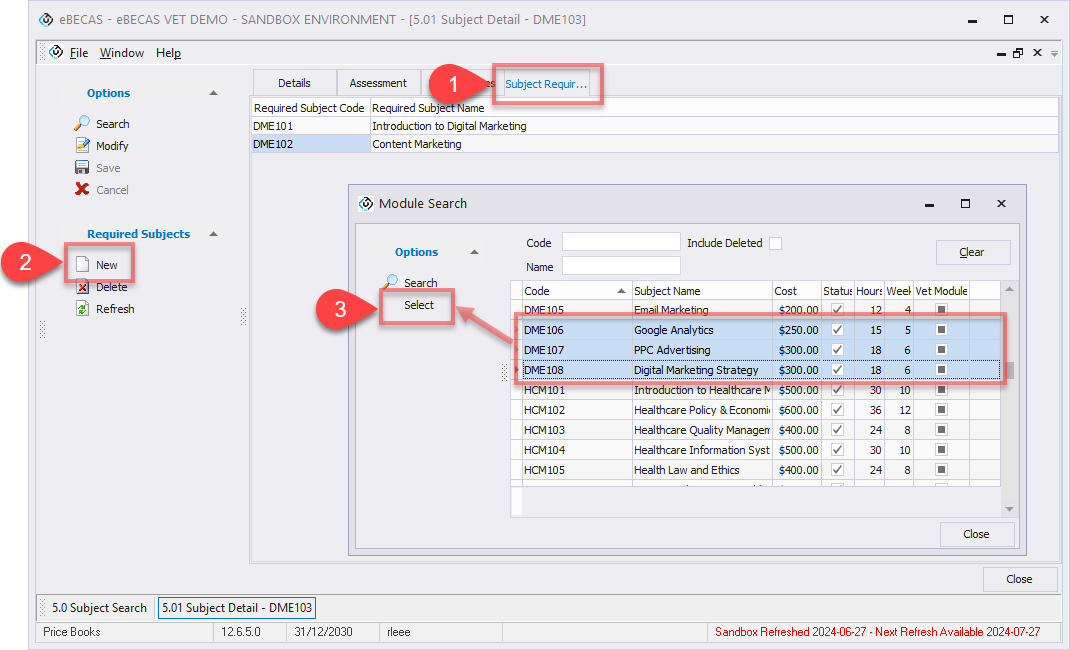
Go to the Subject details page for the subject you want to configure, then navigate to the Subject Requirements tab.
-
Click New and search the subjects you want to set as prerequisites for the current subject. When searching required subjects, the following rules apply:
-
The current subject itself cannot be selected as a requirement.
-
Subjects that already list the current subject as a requirement cannot be selected.
-
-
Select subject(s) using Ctrl or Shift key, then click select button to add. Once added, the selected subjects will be treated as prerequisites for the current subject.
Removing Subject Requirements
To remove subject requirements:
-
Go to the Subject details page for the subject you want to configure, then navigate to the Subject Requirements tab.
-
Select the subjects you want to remove from Subject Requirements.
-
Click Delete from the side menu to remove.
Once removed, the selected subjects will no longer be treated as prerequisites for the current subject.