
Create a Study Tour Enrolment
Study Tour enrolments are automatically created when a Study Tour offer is accepted. Upon acceptance, a Study Tour enrolment is generated to represent the overall tour, along with linked enrolments for each student included in the offer.
Edit Study Tour Enrolment Details
You can edit the basic details of a Study Tour enrolment after it has been created.
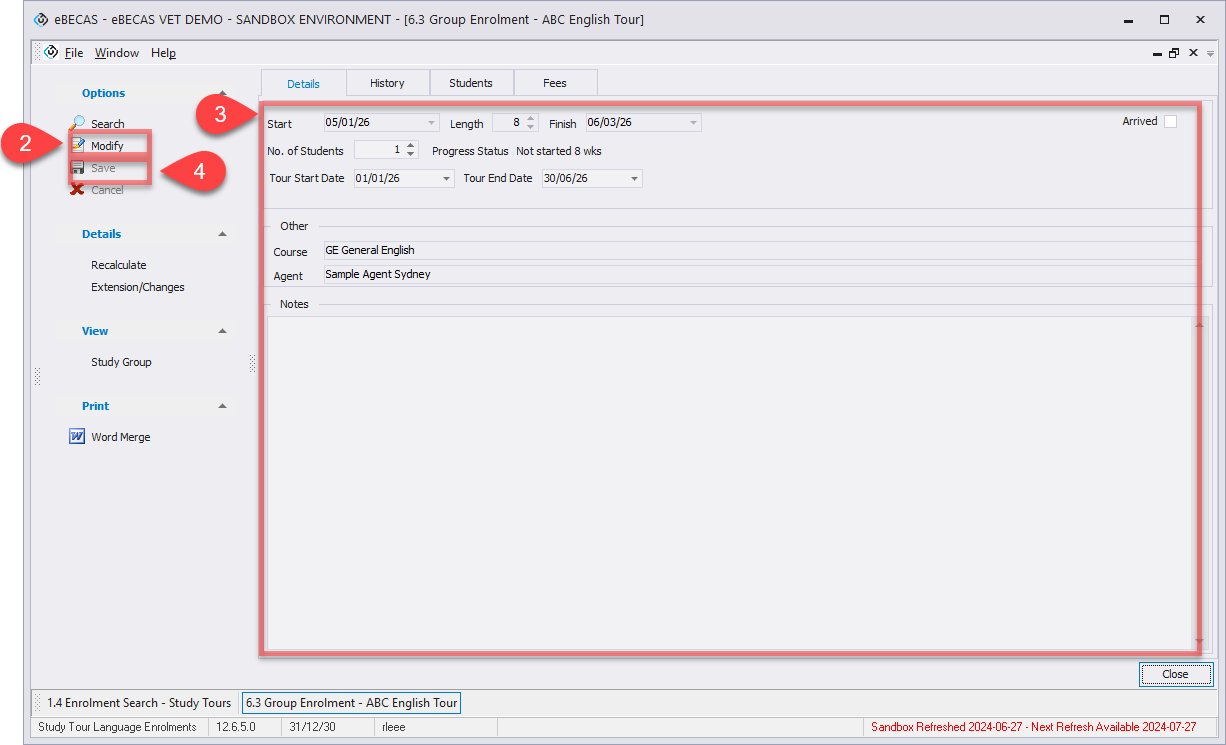
To edit Study Tour enrolment details,
-
Go to the Study Tour enrolment you would like to update.
-
Click on Modify from the side menu.
-
Update the required details.
-
Click Save to apply the changes.
Study Tour Enrolment Variations
For detailed information about enrolment variations, please refer to the following article: Study Tour Enrolment Variations
Delete a Study Tour Enrolment
Study Tour enrolments cannot be deleted. If an enrolment is no longer required, it must be cancelled instead.