
A Company represents the legal entity that supports the organisation’s operations and compliance requirements. It is used for regulatory and reporting purposes and is referenced when configuring other organisational structures within the system.
View Companies
Companies are managed from the Utilities menu.
To view companies:
-
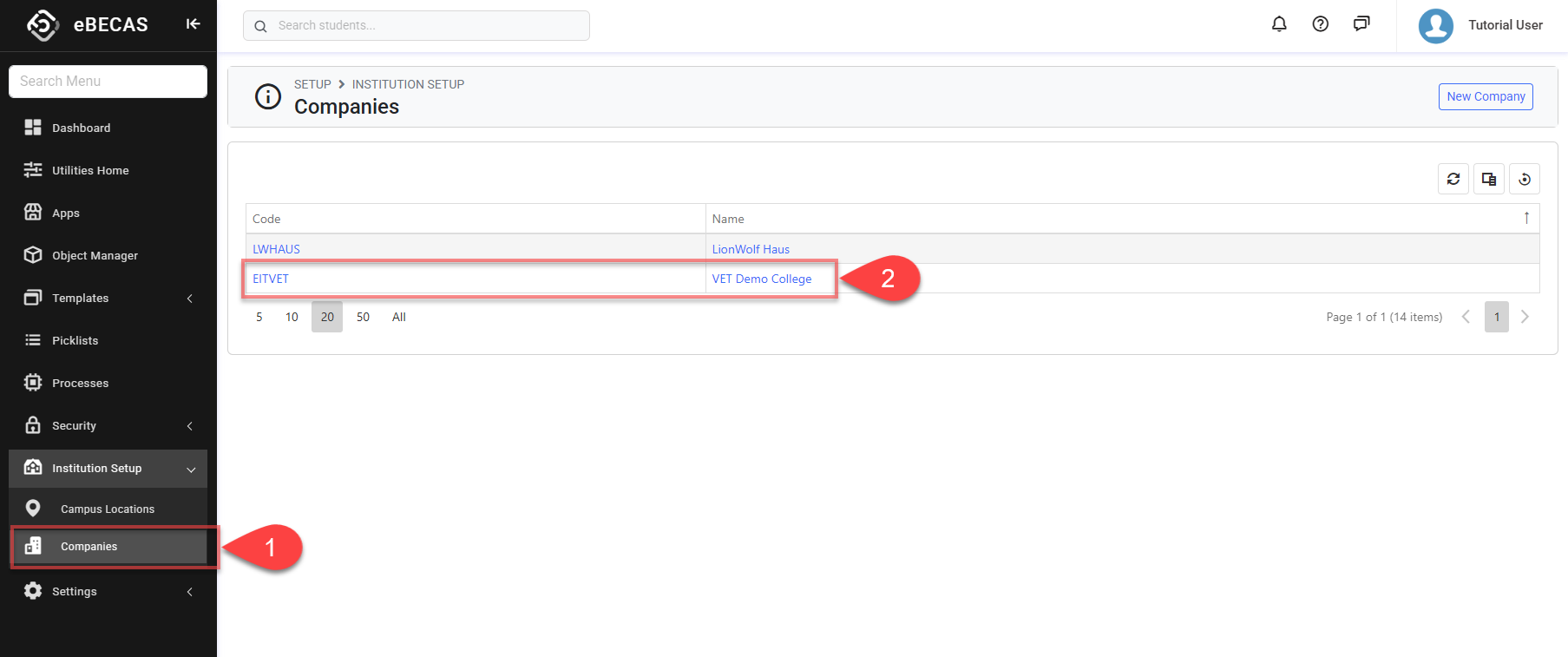
From the Utilities menu, go to Institution Setup > Companies.
-
The data grid will display all Company entries in the system. Click the code or name that you’d like to view.
Create Companies
A new Company should only be created when the school operates under a separate legal or business entity that needs to be managed independently within the system.
In most cases, a single Company is created to represent the school or organisation operating the system. Additional Companies are typically required only when multiple entities exist, each with its own operational and regulatory responsibilities.
Before creating additional Companies, it is recommended to confirm whether a separate legal or operational entity is required.
To create companies:
-
From the Utilities menu, go to Institution Setup > Companies, then click New Company button on the top right.
-
Fill the details.
-
Click Create to save and finish.
Edit Companies
Updating a Company’s details—such as its code or name—automatically updates that reference wherever the Company is used across the system. This ensures that the Company is displayed consistently in related records, filters, and selection lists.
Because Company information is shared across multiple areas, changes made to a Company will be reflected in any features or data that reference it, without altering the underlying records themselves. This allows Company details to be kept up to date while maintaining the integrity of existing data and historical information.
To edit companies:
-
From the Utilities menu, click on company that you’d like to edit.
-
Edit the details as required.
-
Click Update to save and finish.
Delete Companies
Companies cannot be deleted once created.