
Student Self Allocation requires a Units of Study structure. Units of Study are created and managed at the Course level. The Faculty settings determine whether courses under the Faculty use Units of Study and whether students can complete subject and class allocation through the Student Portal.
Confirm the Course Can Use Units of Study
Before a course can be used for Student Self Allocation, the course must have a Units of Study structure configured.
Review the Course setup to confirm that the required Units are available for the course. For detailed information about the Units of Study setup, refer to Units of Study.
Understand How Subjects are Assigned or Selected
Subjects can be assigned to a specific Unit when the course requires those subjects to be studied in that Unit. This can be used to set the default subjects for that Unit when the Enrolment is created.
Linked or predefined subjects do not always prevent students from selecting or changing subjects through the Student Portal.
Whether students can select or change subjects depends on the subject allocation settings configured for the Faculty. If subject allocation is enabled and the allocation window is open, students can select or change subjects through the Student Portal, based on the applicable selection rules.
If subject allocation is not enabled, or the allocation window is closed, students cannot change subjects through the Student Portal. In this case, they select classes for the subjects already assigned to their Units.
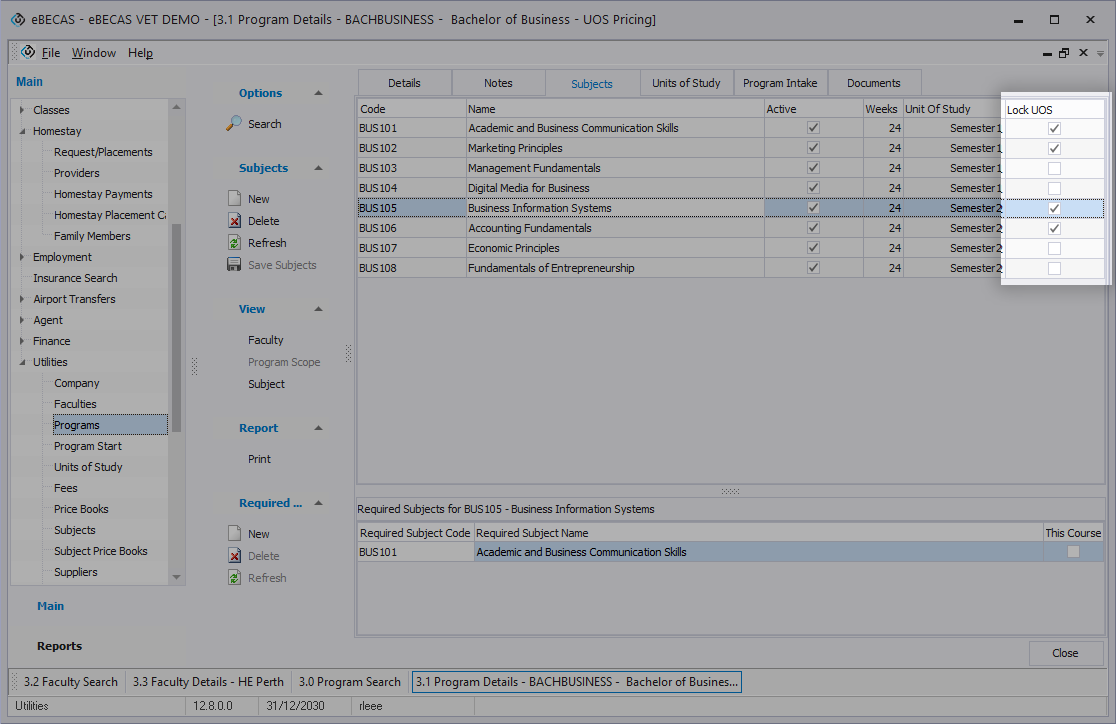
Lock UOS
The Lock UOS option can be used to restrict a subject so it can only be selected in its assigned Unit.
This option works together with the subject’s Unit of Study field.
If a subject has a Unit of Study assigned and Lock UOS is enabled, the subject is only available for selection in that assigned Unit.
For example, if Subject 3 is assigned to Unit 2 and Lock UOS is enabled, students cannot select Subject 3 during the Unit 1 selection period. Subject 3 becomes available when students complete selection for Unit 2.
If Lock UOS is enabled but no Unit of Study is assigned to the subject, the subject is not available for selection in any Unit through the Student Portal.
Administrators can still assign or clear subjects later from the Enrolment Results tab or 1.8 VET&HE Results menu where required.
Next Step
After the Units of Study and Course settings are prepared, create the student’s enrolment using the applicable course.
The Units of Study structure configured for the course is applied to the student’s enrolment.