
The Equator CRM App offers a range of tools for capturing, engaging, nurturing, and converting prospective students into paying customers.
A Customer Relationship Management (CRM) system is vital for effectively managing interactions with potential students or other stakeholders. Integrating these features into eBECAS/EDMISS offers significant advantages:
-
It eliminates the need for separate systems, reducing the risk of duplicated work.
-
It ensures data consistency and accuracy, as there's no need to transfer data between systems, a process that can often lead to errors.
-
It allows more streamlined and efficient workflow, improving both staff productivity and student experience.
The Equator CRM App is a paid add-on. Contact your system administrator for details.
What can you use the CRM Features for
-
Create branded public forms to capture leads.
-
Create branded and highly customisable application forms that you can seamlessly convert into students and offers.
-
Record the interactions with potential students using rich text notes.
-
Engage with your potential students by sending emails or SMS within the system.
-
Create and merge custom documents for your leads.
-
Export and analyse the data for your leads and opportunities.
-
Customise your sales/recruitment pipeline and workflows with custom statuses and stages.
CRM Features Overview
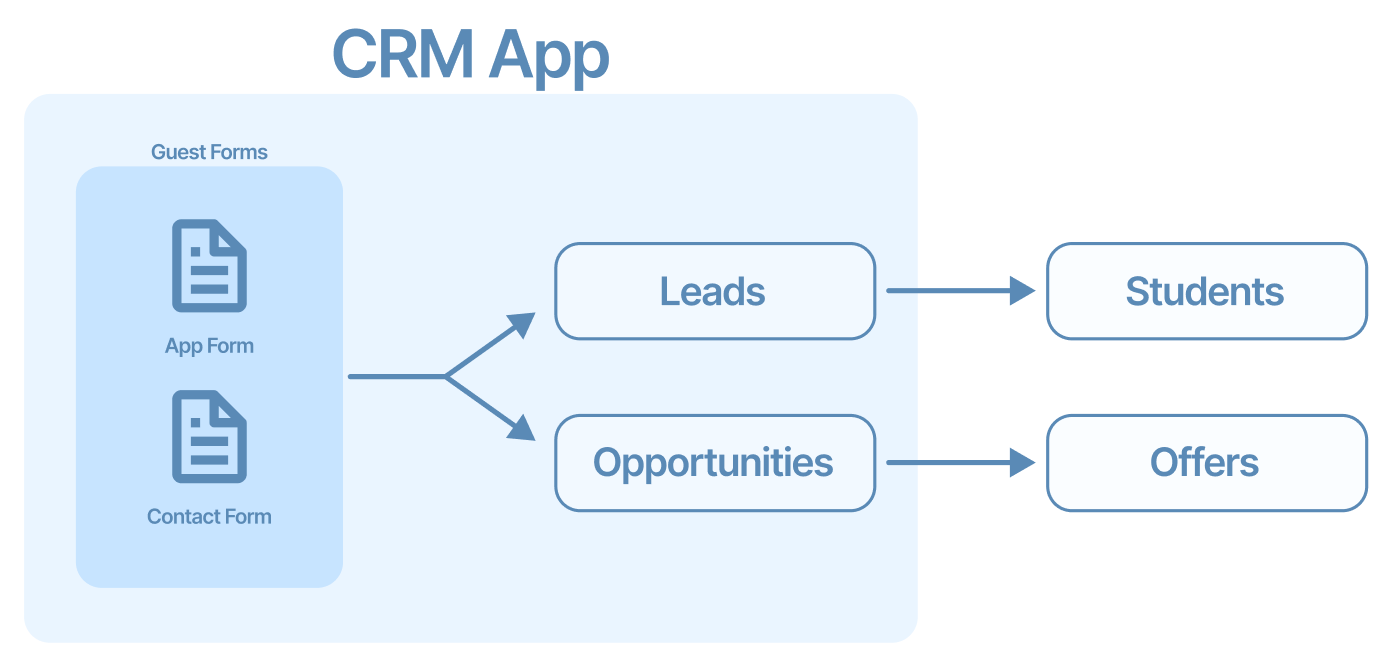
The following diagram shows how you can use the features available in the Equator CRM App:
Topics
-
Leads Manage your leads efficiently and convert them into Students seamlessly without the need of an external system.
-
Opportunities Use opportunities to track and manage potential sales and convert them seamlessly into Offers.
-
Convert Leads and Opportunities Lead conversion is the process of turning a lead, or prospective customer, into an actual customer. This article explores the process of converting your leads into students and opportunities into offers.
-
Guest Forms With Guest Forms, you can create and publish highly customisable forms to collect details directly in the App. Whether you want to create an Application Form or a just a simple Contact form, the Guest Forms got you covered.