Enrolment warnings help you understand when a student’s progress may require closer attention. By reviewing the latest and past warnings in one place, college can respond early and provide the right support.
View Last Enrolment Warnings for Enrolments
The following fields on the enrolment record track the most recent enrolment warning. If multiple warnings are created for the same enrolment, only the latest one is recorded.
-
Last Warning Date – The entry date of the most recent warning issued.
-
Last Warning Category – The warning category of the most recent warning issued.
You can add these fields in the grids of the following pages through the Column Chooser:
View Enrolment Warnings
-
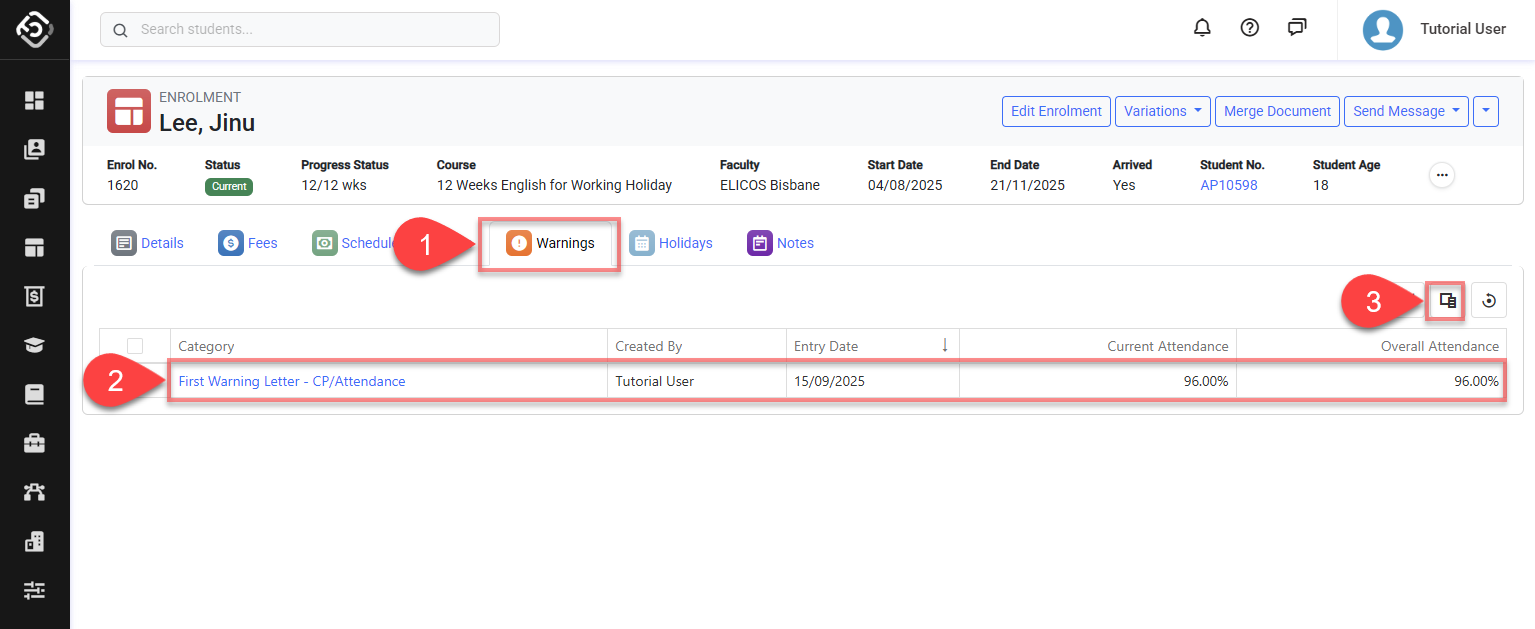
Go to the Enrolment Details page of interest and click on the Warnings tab.
-
The Enrolment Warnings grid will display.
-
(Optional) Use the Column Chooser to add or remove fields (view this article for more details: Data Grids).
The fields available on the grid are:-
Category: The category of the warning entry.
-
Created By : User who issued the warning entry.
-
Created On: Date/Time when the warning entry was created in the system.
-
Entry Date: Issue Date of the warning entry.
-
Current Attendance: The current attendance when the warning was issued.
-
Overall Attendance: The overall attendance when the warning was issued.
-
Current Study Hours: Total study hours accrued up to the issuance date of the warning.
-
Enrol Study Hours: Total study hours for the enrolment.
-
Total Absent Hours: Total hours absent accrued up to the issuance date of the warning.
-