
These accounts can then be selected and referenced in finance-related processes within the system, such as Receipts and Reconciliation of External Payments. Some bank accounts can also be marked as Trust Accounts depending on how the college manages specific funds.
View Bank Accounts
Bank accounts are managed from the Utilities menu.
To view bank accounts:
-
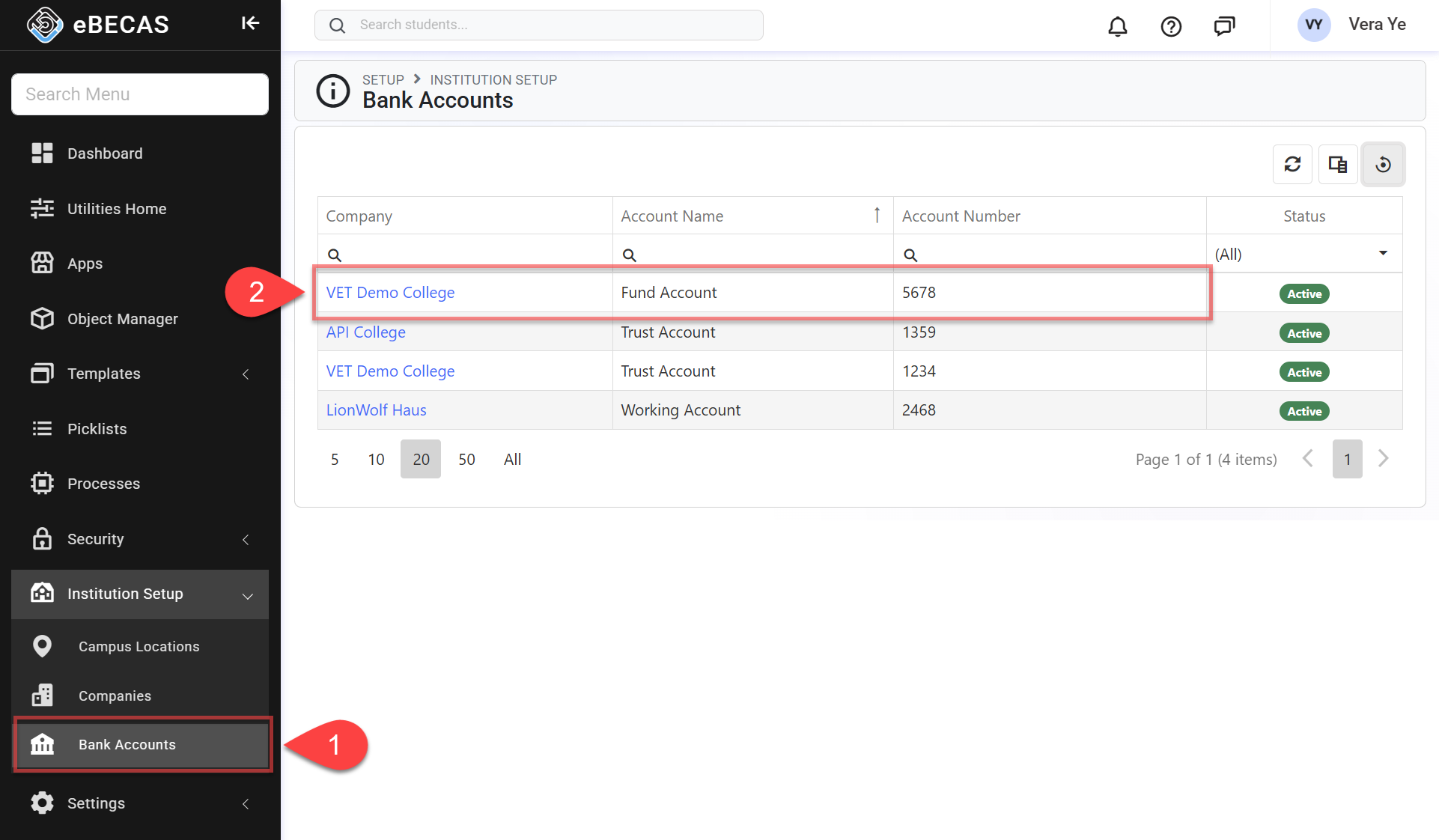
From the Utilities menu, go to Institution Setup > Bank Accounts.
-
The data grid will display all bank account entries in the system. Double click the entry row that you’d like to view.
Create Bank Accounts
Bank Accounts should be created for the accounts that your organisation uses within finance-related processes in eBECAS/EDMISS.
Depending on the organisation’s setup, multiple bank accounts may be created to represent different operational or financial purposes, such as general accounts or trust accounts.
To create bank accounts:
-
From the Utilities menu, go to Institution Setup > Bank Accounts, then click New Bank Account button on the top right.
-
Fill the details.
-
Click Create to save and finish.
Edit Bank Accounts
Updating a Bank Account’s details—such as its name or account number—automatically updates that reference wherever the Bank Account is used across the system. This ensures that the Bank Account is displayed consistently in related finance records, filters, and selection lists.
Because Bank Account information is shared across multiple areas, changes made to a Bank Account will be reflected in any features or data that reference it, without altering the underlying transaction records themselves. This allows Bank Account details to be kept up to date while maintaining the integrity of existing finance data and historical transactions.
To edit bank accounts:
-
From the Utilities menu, double click on the entry row that you’d like to edit.
-
Edit the details as required.
-
Click Update to save and finish.
Delete Bank Accounts
Once a Bank Account has been used in finance-related records—such as Receipts or External Payment Reconciliation—it can no longer be deleted. This helps maintain historical financial records within the system.
If a Bank Account is no longer required, it is recommended to update the account as Inactive status instead.
Bank Accounts that have not yet been used within the system can be deleted if they are no longer required.
To delete a Bank Account:
-
From the Utilities menu, double click on the entry row that you’d like to delete.
-
Click Delete button. This action can’t be undone.