
Skip table of contents

External Payments Settings

Users can configure the external payment rules and defaults that define how external payment activity is managed across the system.

View External Payments Settings

Permissions Required
  • Utilities > Settings > Update Finance Settings

  1. From the Utilities Menu, go to Settings > Finance.

  2. Go to External Payments Settings section.

External Payment Settings

Default Payment Type

This setting determines the default payment type for reconciling external payments. Select the payment type in the dropdown that you’d like to set as the default.

To customise the list of available payment types, update the values on the Payment Type picklist (Global).

Default Bank Account

This setting determines the default bank account for reconciling external payments. Select the bank account in the dropdown that you’d like to set as the default.

Order of Fees for Reconciliation

This setting defines the fee order used during Automatic Reconciliation.

When allocating an external payment, the system applies the payment to invoice items based on this order (top to bottom).

You can adjust the order to suit your organisation’s requirements.

  1. Drag and drop the fee types using the row icon to reorder them. Fees at the top are paid first.

  2. Once updated, click Update to apply the changes.
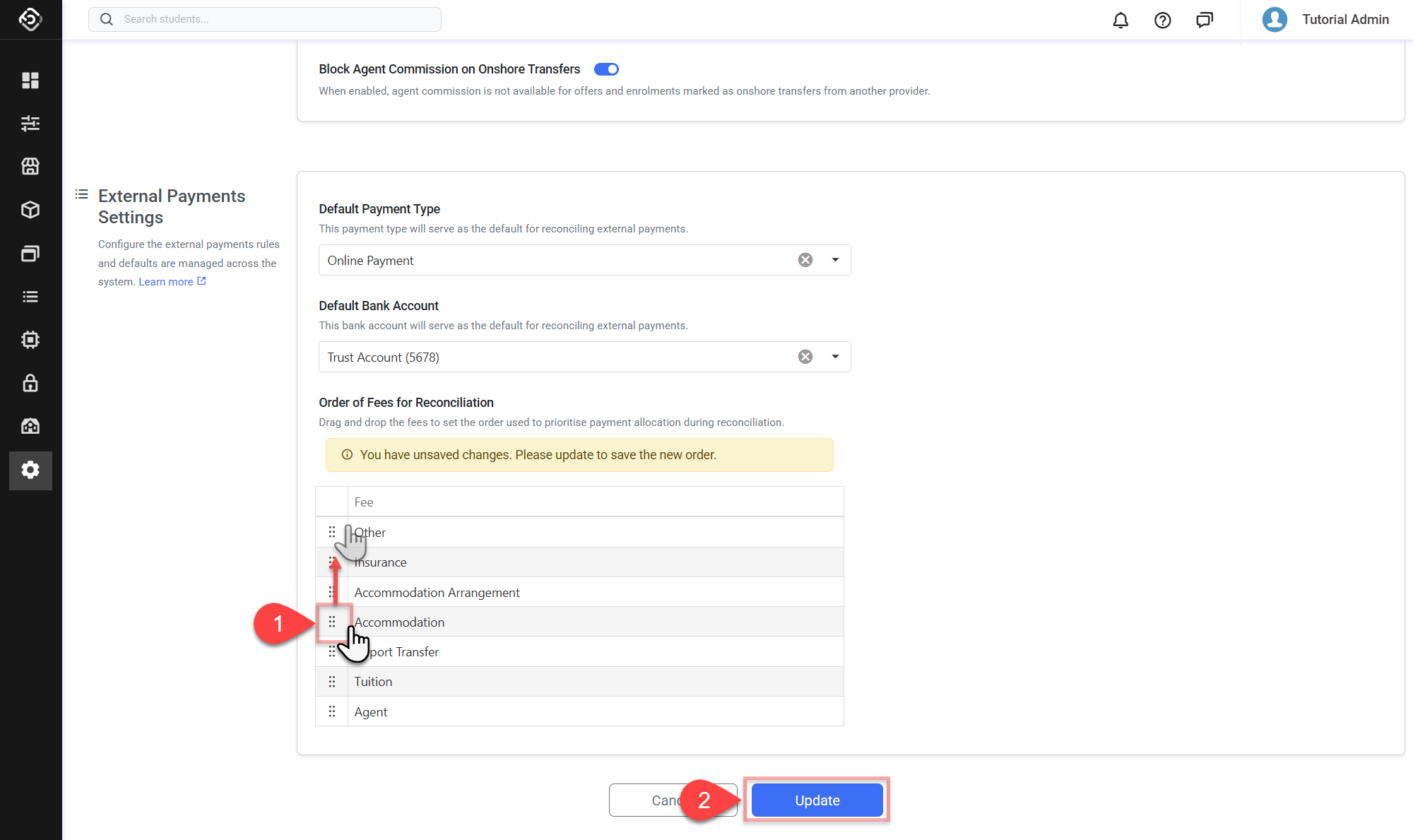
    image-20260324-002229.png
JavaScript errors detected

Please note, these errors can depend on your browser setup.

If this problem persists, please contact our support.