
Program Subject Requirements allow you to manage prerequisite relationships for subjects within a specific program or course. They are used when prerequisite expectations need to vary depending on the course context, even when the same subject is used elsewhere.
While subjects can have default requirements defined at the subject level, program subject requirements provide additional flexibility by allowing those requirements to be adjusted at the program level. This makes it possible to reflect course-specific progression rules without affecting how the subject behaves in other programs.
Program subject requirements apply only within the selected program. Any changes made at this level do not impact other programs that use the same subject, ensuring that prerequisite rules remain isolated to the relevant course structure.
If program requirements are not met, the system restricts result status change and prevent to be assigned to a class until the required subjects are completed.
When Subject Requirements Are Considered Met
Program-specific subject requirements follow the same requirement met rules as standard Subject Requirements.
A requirement is considered met when the required subject meets the accepted Result Status or VET Outcome conditions configured in the system.
For more information about when subject requirements are considered met, see Subject Requirements.
Adding Program Subject Requirements
To add program-specific subject requirements:
-
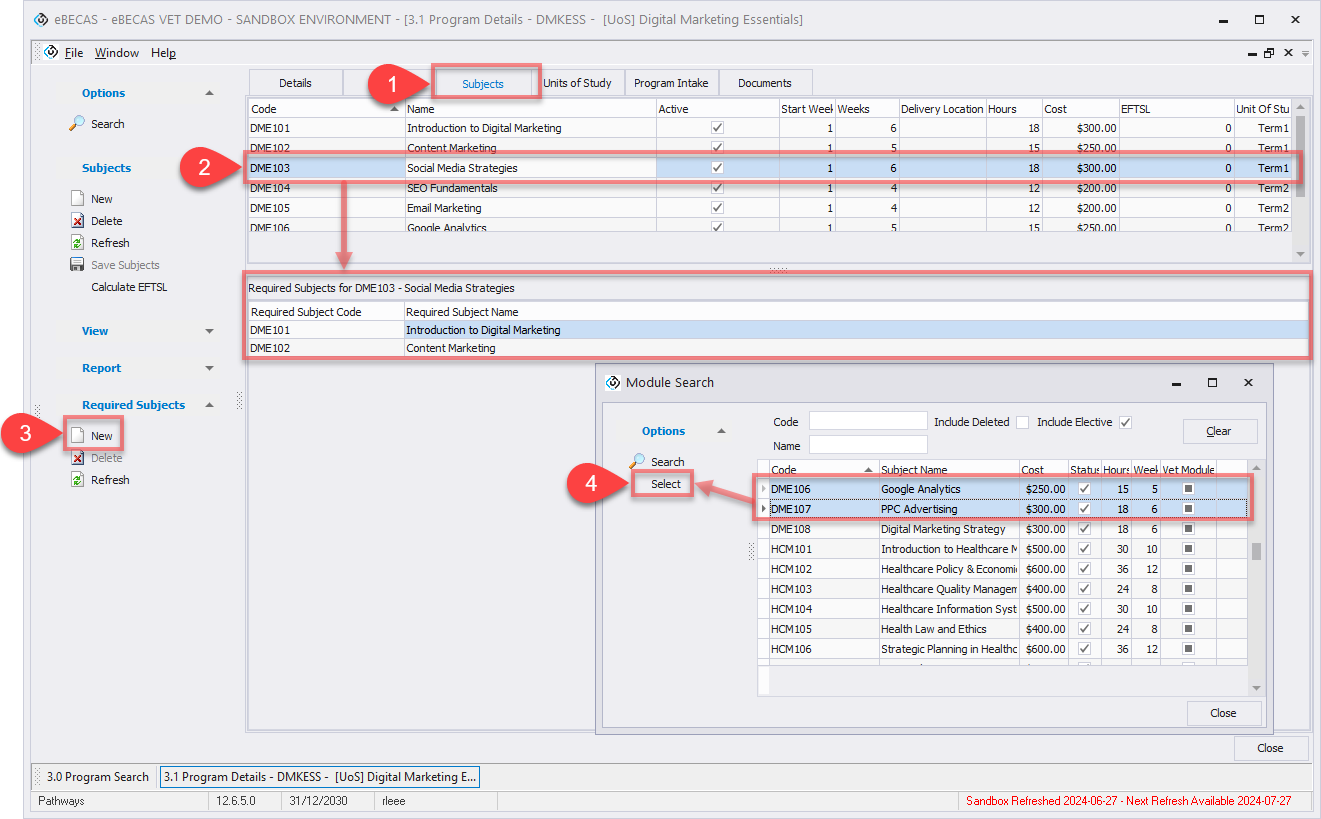
Go to the Program details page for the subject requirement you want to configure, then navigate to the Subject tab.
-
Select the subject you want to configure. When a subject is selected, its default required subjects are displayed.
-
In the Required Subjects section, click New and search the subjects you want to set as prerequisites for the selected subject. When searching required subjects, the following rules apply:
-
The current subject itself cannot be selected as a requirement.
-
Subjects that already list the current subject as a requirement cannot be selected.
-
-
Select one or more subjects using the Ctrl or Shift key, then click Select to add them. Any subjects added here are program-specific requirements. They apply only within the current program and do not affect the same subject when it is used in other programs. The default required subjects defined at the subject level remain unchanged.
Removing Program Subject Requirements
To remove program subject requirements:
-
Go to the Program details page for the subject requirement you want to configure, then navigate to the Subject tab.
-
Select the subjects you want to remove from Subject Requirements.
-
Click Delete from the side menu to remove. Once removed, the selected subjects will no longer be treated as prerequisites for that subject within the current program.