
In this article, we will explore how to access the student Accommodation requests and placements for a single student.
Currently, in the NextGen app, the Student Accommodation Module is limited to only create, edit, remove the Accommodation requests and placements. For all the functionality such as Creating Schedules for Accommodation Payments, use the Classic Desktop App.
We are working on bringing all the functionality to the NextGen App.
Accommodation requests and placements for individual students can be easily viewed from the student profile page. For searching and reviewing Accommodation Requests/Placements across multiple students, see this article: Search Accommodation Requests/Placements.
The student accommodation functionality is provided by the Equator Accommodation and Transfer Services App. If you do not see the details explained in this article, contact your system administrator to make sure the App is installed.
View Student Accommodation Requests and Placements
The Student Services tab is only available for students of type ‘Overseas’.
-
Go to the profile page of the student of interest.
-
Click on the Services tab.
-
You will see the accommodation requests and placements for that student in the grid.
For details about available buttons, refer to this article: Data Grids | Single Grid Composition.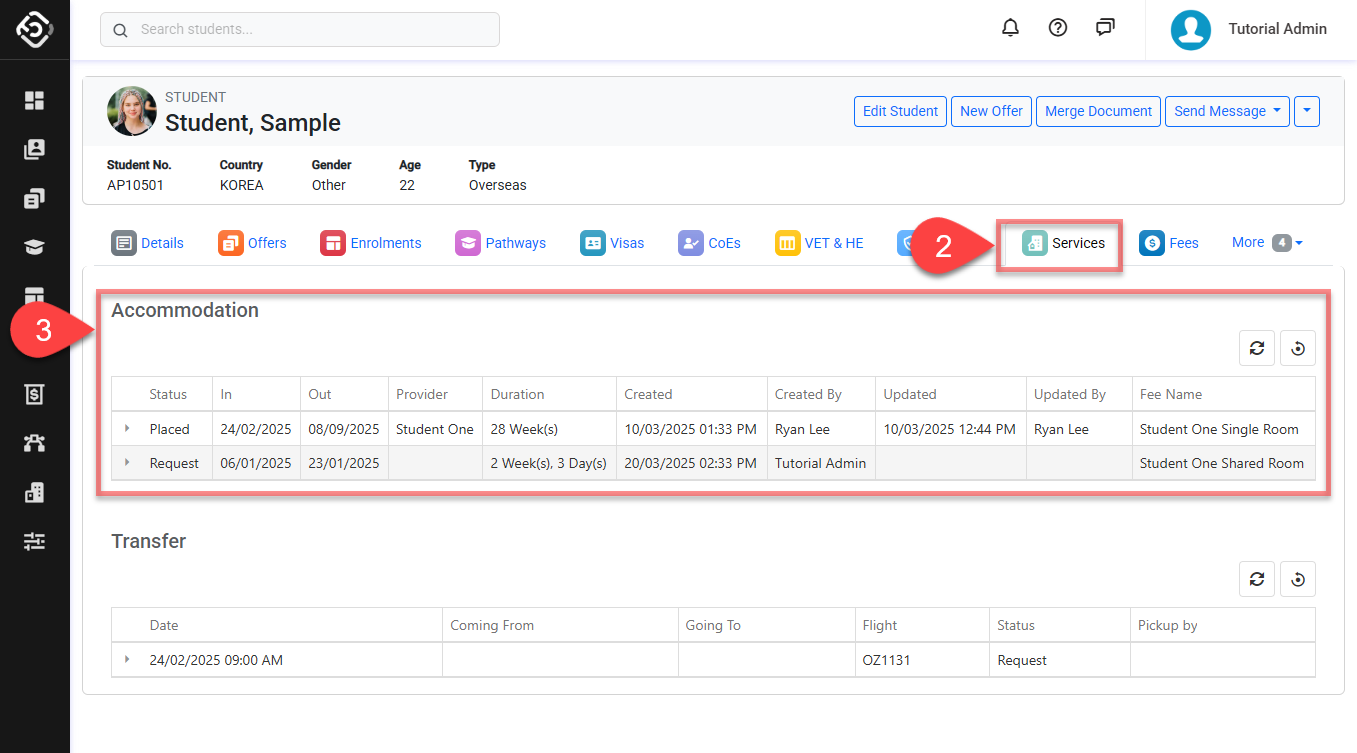
Create a Student Accommodation Request
For more details, see this article: Create, Edit and Delete Accommodation Requests.
Edit a Student Accommodation Request
For more details, see this article: Create, Edit and Delete Accommodation Requests.
Place, Change Bed and Unplace Accommodation Requests
For more details, see this article: Place, Change Bed and Unplace Accommodation Requests.
Delete Student Accommodation Requests
For more details, see this article: Create, Edit and Delete Accommodation Requests.