
Airport Transfer Requests Search brings together transfer requests across students, helping staff review pickup details and Providers, find requests that need attention and update request statuses.
To create or manage a request for an individual student, see Student Airport Transfers.
Airport Transfer Requests Search View
The Airport Transfer Requests Search View is the main place to view, explore and search Airport Transfer Requests across students.
Tip
Customise the views to efficiently access the data you need. You can customise the columns, sorting and filters on the grid. Learn how to use Views.
-
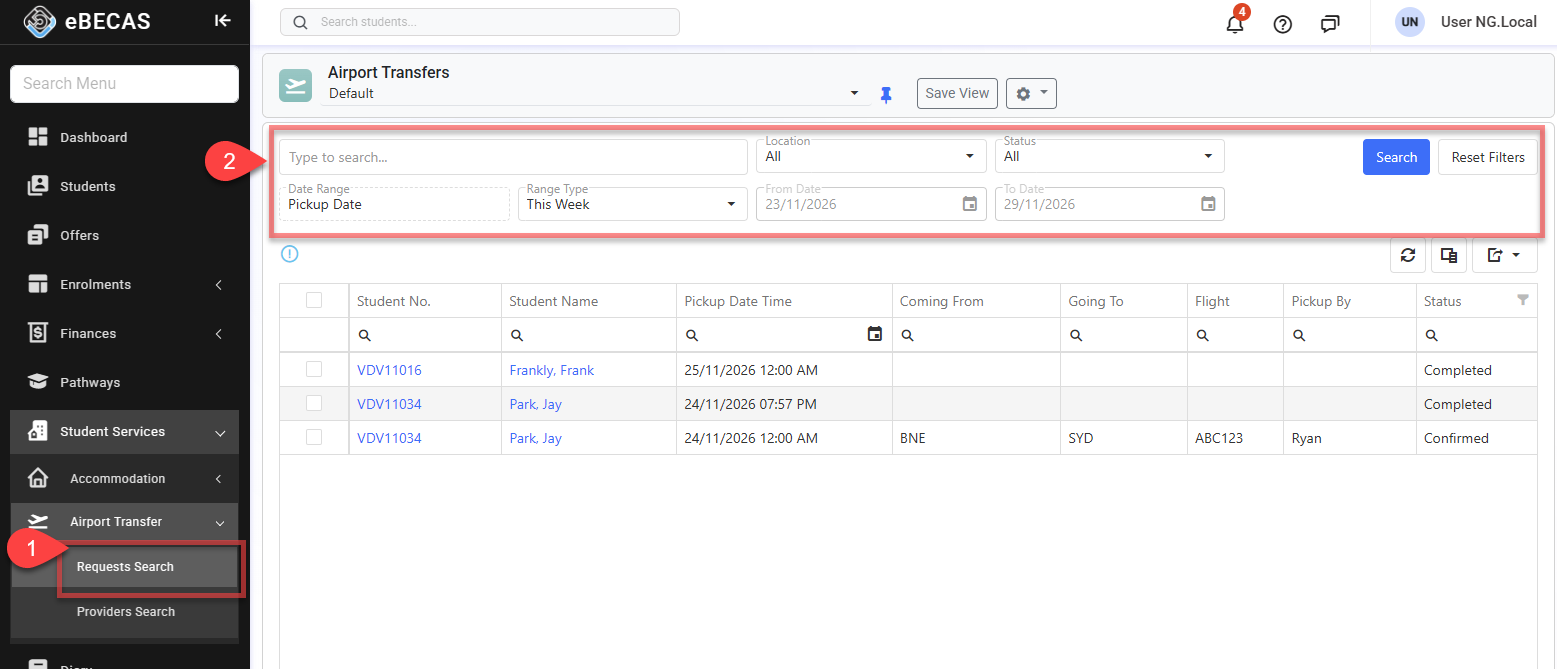
From the Main menu, go to Student Services > Airport Transfer > Requests Search.
-
Use the filters available to find the requests you are looking for and click Search or press Enter. The filters available are:
-
Quick Search: You can use any of the following in the search box:
-
Student First Name, Middle Name, Last Name, Preferred Name
-
Student Number
-
Student Email
-
Student Mobile Number (excluding symbols like '+', '-')
-
-
Location: Filter requests by the selected Location.
-
Status: Filter by the Airport Transfer Request status.
-
Date Range: The search uses Pickup Date to find airport transfer requests within the selected period.
-
Range Type: Allows users to set predefined date ranges, automatically populating the From/To Date filter based on the selected range.
-
Custom: Uses the manually entered From/To Date.
-
Day: Sets the From/To date to yesterday, today, or tomorrow.
-
Week: Sets the From/To date to the last, current, or next week.
-
Month: Sets the From/To date to the previous, current, or next month.
-
Quarter: Sets the From/To date to the last, current, or next quarter.
-
Calendar Year (CY): Sets the From/To date to the last, current, or next calendar year.
-
To-Date: Sets the From date as the beginning of the current month, quarter, or year and the To date as Today.
-
-
If you need more filters, you can use Column Filters and the Advanced Filter.
See this article for more details: Data Grids. -
You can customise the grid by adding/removing columns as required. See this article for more details: Data Grids: Customise Data Grids.
-
-
To navigate to the student airport transfer request list, click on the Request No. on the row of interest.
Actions on the Airport Transfer Requests Search View
From the Airport Transfer Request Search View, you can take quick actions on one or multiple entries using the grid actions.