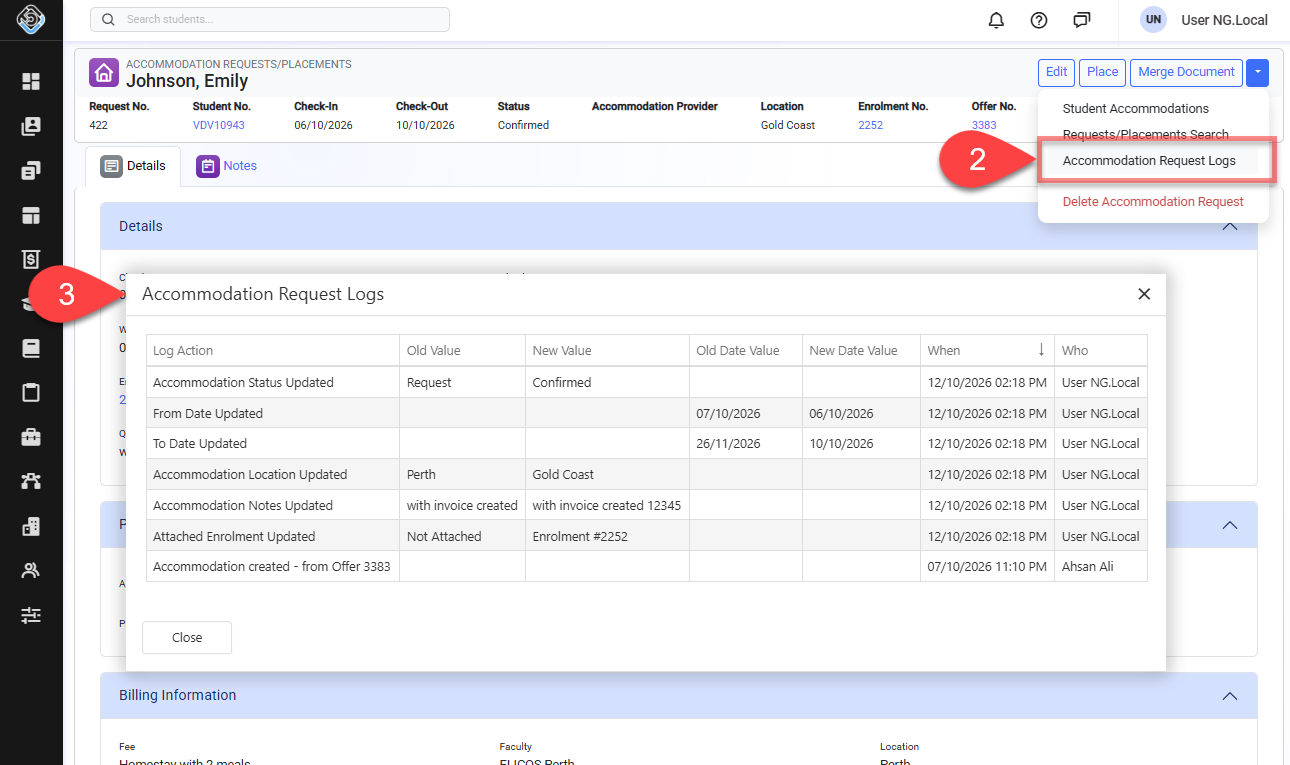
For auditing purposes, Accommodation Request Logs record and display events related to updates made to an Accommodation Request.
Events Recorded
The events recorded in the Accommodation Request Logs are:
-
Accommodation Request creation.
-
Check-In Date changes.
-
Check-Out Date changes.
-
Quick Note changes.
-
Accommodation Request status changes.
-
Location changes.
-
Accommodation Provider changes.
-
Bed changes.
-
Accommodation Payment creation.
Changes made to existing Accommodation Payments, including edits or deletions, are not recorded in the Accommodation Request Logs.
View Accommodation Request Logs
-
Go to the Accommodation Request Details page of interest.
-
Click the dropdown menu in the top-right corner and select Accommodation Request Logs.
-
The Accommodation Request Logs window will display. The details available are:
-
Log Action: The type of operation that was performed.
-
Old Value: The text value before the change was made.
-
New Value: The text value after the change was made.
-
Old Date Value: The date value before the change was made, where applicable.
-
New Date Value: The date value after the change was made, where applicable.
-
When: The timestamp of when the operation was performed.
-
Who: The user who performed the operation.
-