
A Study Tour Offer is a group-level proposal for the courses and services provided to students participating in a study tour. Unlike a standard student offer, which is created for a single student, a Study Tour Offer can include multiple participating students.
Overview
Study Tour Offers are used to prepare and manage the proposed commercial arrangements for a study tour before they are accepted and confirmed.
Each Study Tour Offer represents a specific set of arrangements prepared for a Study Tour Group. It can include:
-
Courses and study dates
-
Tuition and additional fees
-
Insurance, accommodation, and airport transfer services
-
Instalments and payment arrangements
-
The students participating in that particular offer
A single Study Tour Group may have multiple offers over time. For example, the same group may have one offer for a May intake and another for a September intake, with different students, courses, dates, fees, and services included in each offer.
Concepts and Terminology
Before creating Study Tour Offers, it is helpful to understand the following concepts.
Study Tour Offers and Student Offers
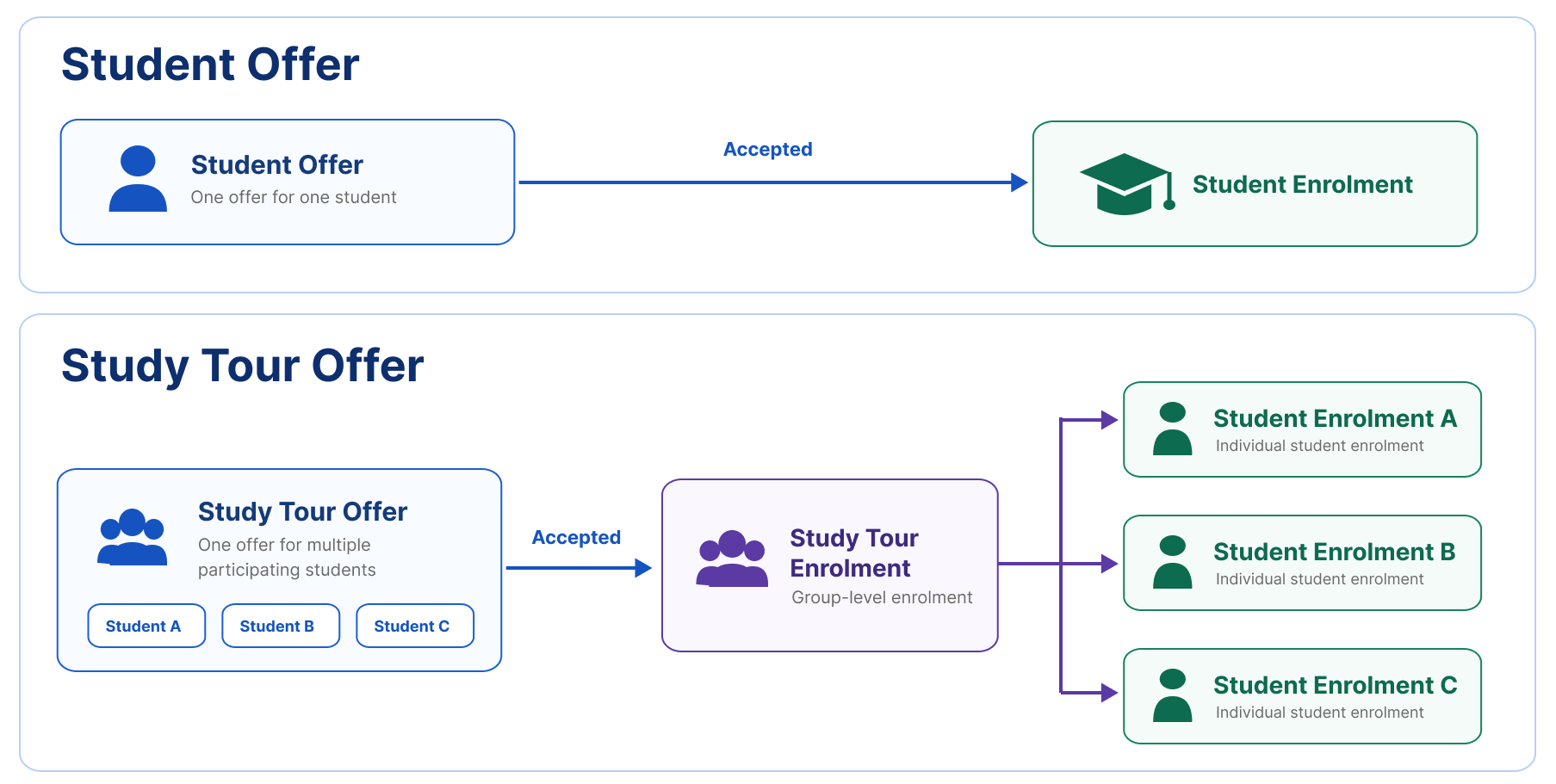
A Student Offer is created for an individual student and contains the courses, fees, services, and payment arrangements offered to that student only.
A Study Tour Offer is created for a Study Tour Group and can include multiple participating students within a single offer. The Study Tour Group is the customer responsible for the group arrangements, billing, and payment, while the participating students are linked to the offer for their individual enrolment and service requirements.
When a Student Offer is accepted, enrolments and financial records are created for the individual student. When a Study Tour Offer is accepted, group-level Study Tour Enrolments and financial records are created for the Study Tour Group. Individual student enrolments are also created for the participating students and linked to the relevant Study Tour Enrolments; however, financial records are created and managed only at the Study Tour Enrolment level.
Offer Class
Every study tour offer created belongs to one of the following classes:
-
Offer-Group: This class represents an offer created for a Study Group.
-
Offer-Invoice: This class represents an offer that was created automatically by issuing an invoice directly for an existing enrolment.
-
The Offer Class is assigned automatically by the system and it cannot be modified.
-
The Offer Class is displayed in Offer Class field in the Study Tour Offers object.
Visa Type
Study Tour Offers do not use the Visa Type field. Visa information, where required, is managed separately for each participating student record and can be linked to individual student enrolment after the Study Tour Offer is accepted.
Offer Item Groups
Offer Items are organised into Offer Item Groups. Each Course Item creates a separate Offer Item Group.
When the Study Tour Offer is accepted, each Offer Item Group containing a course creates a separate Study Tour Enrolment. Individual student enrolments are then created and linked to the corresponding Study Tour Enrolments for any participating students included in the offer.
Study Tour Offer Process
The typical Study Tour Offer process is:
-
Create the Study Tour Group.
-
Create a Study Tour Offer for the relevant programme or intake.
-
Add and configure the required Offer Items, such as courses, fees, insurance, accommodation, and airport transfers.
-
optional Add the participating students to the offer.
-
Review and accept the offer.
Adding students at the offer stage is optional. Existing students can be searched for and added to the offer, or new student records can be created and added directly.
A Study Tour Offer can also be accepted without students. After the Study Tour Enrolment is created, students can be added directly to the enrolment. When a student is added, an individual student enrolment is automatically created and linked to the Study Tour Enrolment. For more details, please visit this article: Study Tour Enrolment Variations
When a Study Tour Offer Is Accepted
When a Study Tour Offer is accepted, one or more group-level Study Tour Enrolments are created (one enrolment for every course in the offer).
Individual student enrolments are also created for each participating student and linked to the corresponding Study Tour Enrolments. These individual enrolments are used to manage student-specific information such as class allocations, attendance, warnings, results, and holidays.
Invoices and other financial records are generated from the accepted offer arrangements, and managed only on the relevant Study Tour Enrolments. Financial records are not created for the linked individual student enrolments.
Topics
-
Create, Edit and Accept Study Tour Offers Managing study tour offers efficiently is crucial to a successful study tour admission process.
-
Search Study Tour Offers The ability to quickly search and find specific study tour offers is crucial for efficient administration and processes. Whether you're updating offer details, communicating with the study tour group and/or the students, or reviewing study tour offer items and instalments, knowing how to effectively use the search functions can significantly streamline these processes.
-
Study Tour Offer Details A Study Tour Offer contains the products, pricing, dates, and other arrangements prepared for a Study Tour Group. It uses the same general structure and functions as an individual offer, while remaining linked to the relevant Study Tour Group.
-
Study Tour Offer Items Once you have created a Study Tour Offer, you can add the courses, products, and services to be included in the offer. Study Tour Offer Items follow the same general structure as standard Offer Items, with additional options for calculating group pricing and creating services at either the study tour group level or the individual student level.
-
Study Tour Offer Instalments / Payment Plans Instalments allow the total amount of a Study Tour Offer Item to be divided into multiple payments, each with its own amount, due date, and payer.
-
Study Tour Offer Prepayments Study Tour Offer Prepayments allow users to select instalments from one or more Offer Items as the initial payment required before the offer is accepted.
-
Study Tour Offer Students Students participating in a Study Tour can be added to the Study Tour Offer by creating new student records or selecting one or more existing students.
-
Study Tour Offer Holidays Holiday periods can be added to a Study Tour Offer before it is accepted. Once the offer is accepted, the holidays are transferred to the corresponding enrolments created for each student.
-
Study Tour Offer Logs For auditing purposes, Study Tour Offer Logs record and display events related to Offer Status updates.