
Happy New Year and welcome to our January 2026 updates for eBECAS/EDMISS Next Generation.
This month’s release focuses on extending visibility beyond the system, strengthening compliance tracking, and adding greater flexibility across enrolments, payments, and institutional setup.
It’s a strong start to the year and a solid foundation for what’s ahead in 2026. Let’s dive in!
Agents Updates
🔥 Introducing the Agents List Widget for Easy Agent Publishing
new Nextgen ONLY
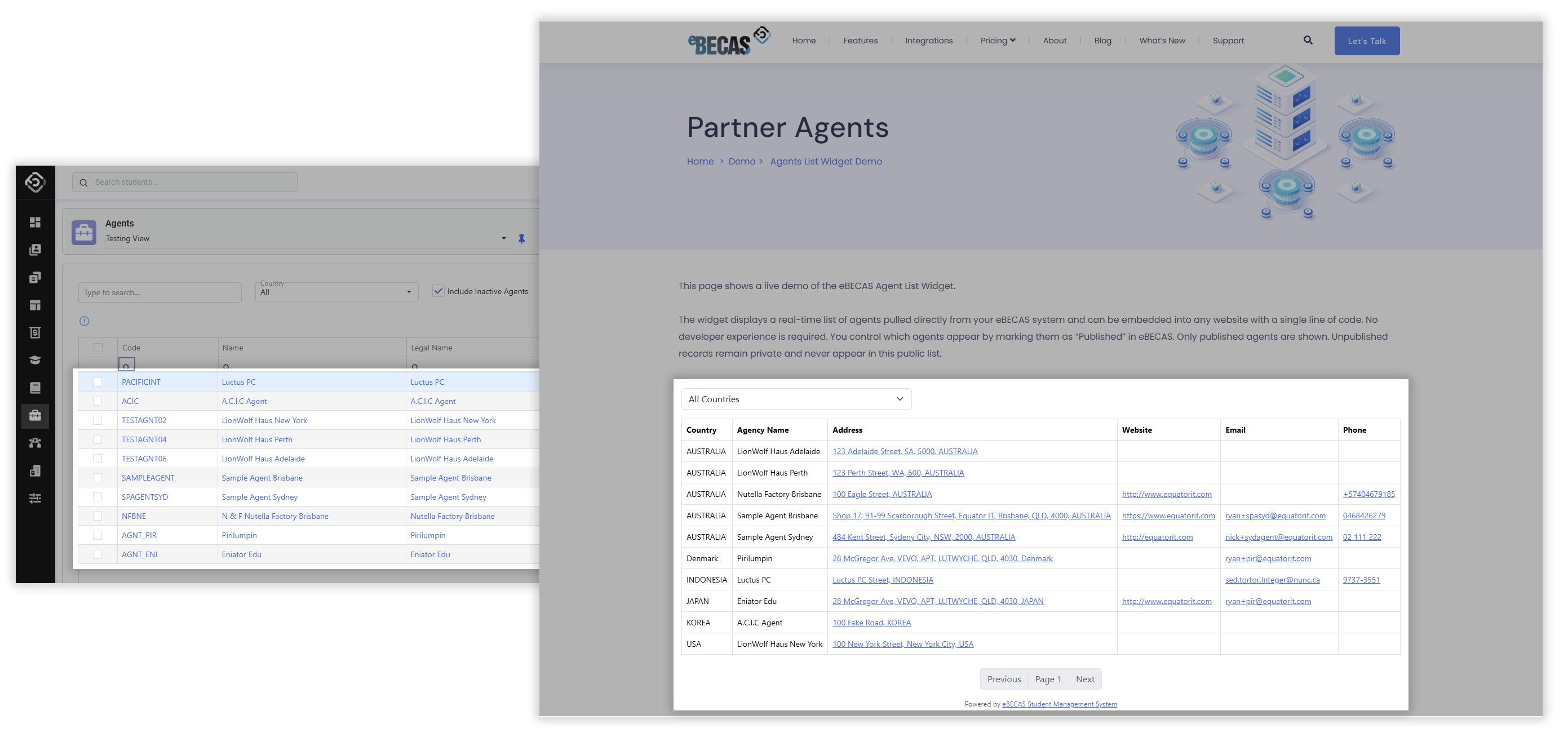
The new Agent List Widget is now available in eBECAS/EDMISS, giving you a fast and effortless way to publish your official agents list directly on your own website.
Many institutions still rely on spreadsheets, PDFs, or static web pages to manage agents. These lists are hard to maintain, quickly fall out of date, and require ongoing manual updates. The Agent List Widget removes this work entirely.
Getting started is simple. You only need to add a single line of code to your website to activate the widget. No developer is required. Once added, the widget automatically displays a live, real-time agents list pulled directly from eBECAS or EDMISS.
There is no separate list to manage and no external files to keep in sync. Any change made in the system is reflected instantly on your website.
Security is built in. The widget can only be embedded on trusted domains that you approve, ensuring it appears only on authorised college websites or portals.
You stay in full control of what is shown. Updating agent visibility takes seconds and your website updates immediately, keeping your agents list accurate, secure, and always up to date.
🚩 Published Field for Agents: Control What Appears on Your Website
new
A new Published field is now available on Agents, giving you precise control over which agents appear in the Agents List Widget on your website.
The new field adds an extra layer of control, allowing you to decide which active agents are publicly displayed in the Agents List Widget.
✅ Publish Agents in Bulk
new Nextgen ONLY
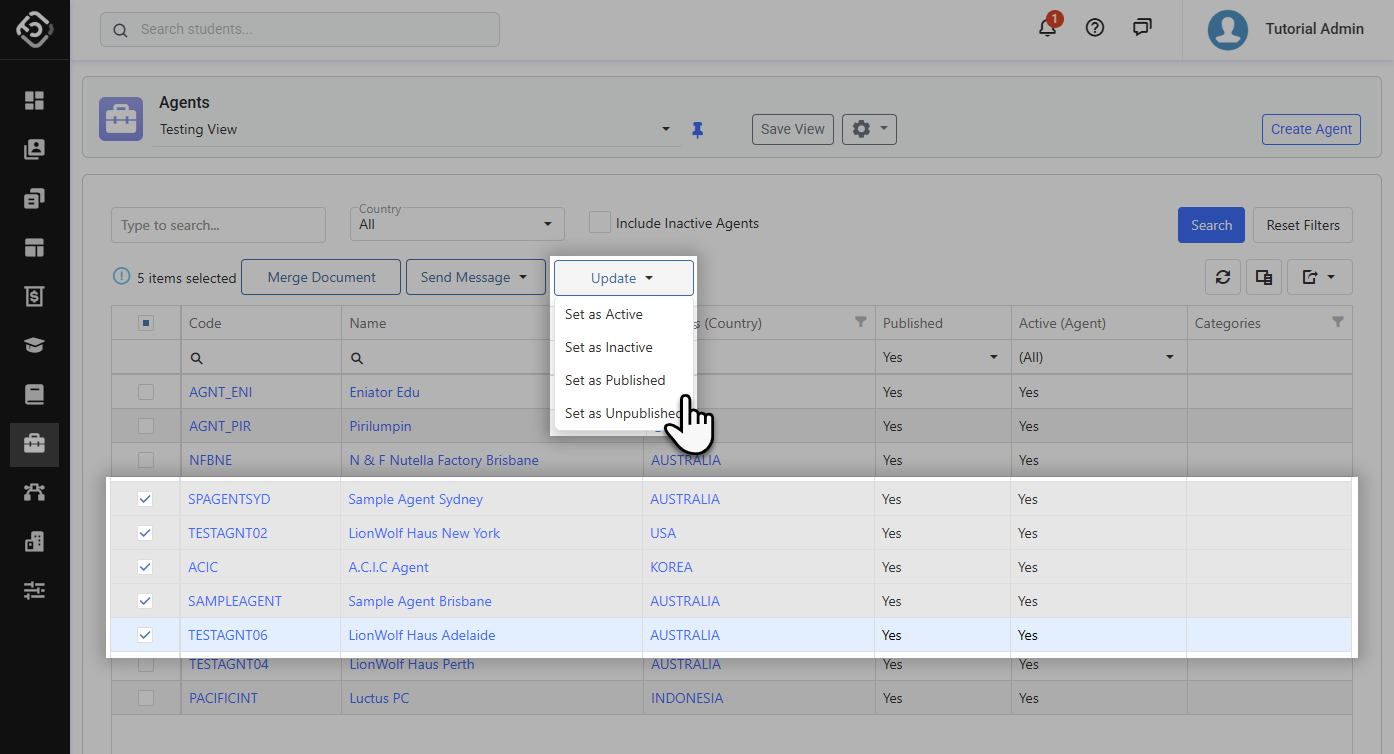
Managing agent visibility one by one can be time-consuming, especially when onboarding new agents or updating your website list.
New Bulk Publish/Unpublish options are now available, allowing you to publish/unpublish multiple agents at once for use in the Agents List Widget.
With this option, you can:
-
Select multiple agents in the list view.
-
Apply the Published/Unpublish status in a single action.
-
Instantly update which agents appear on your website.
This is ideal for initial setup, seasonal updates, or large agent onboarding, removing repetitive work and reducing the risk of missed updates.
Students Updates
New Gender List
new
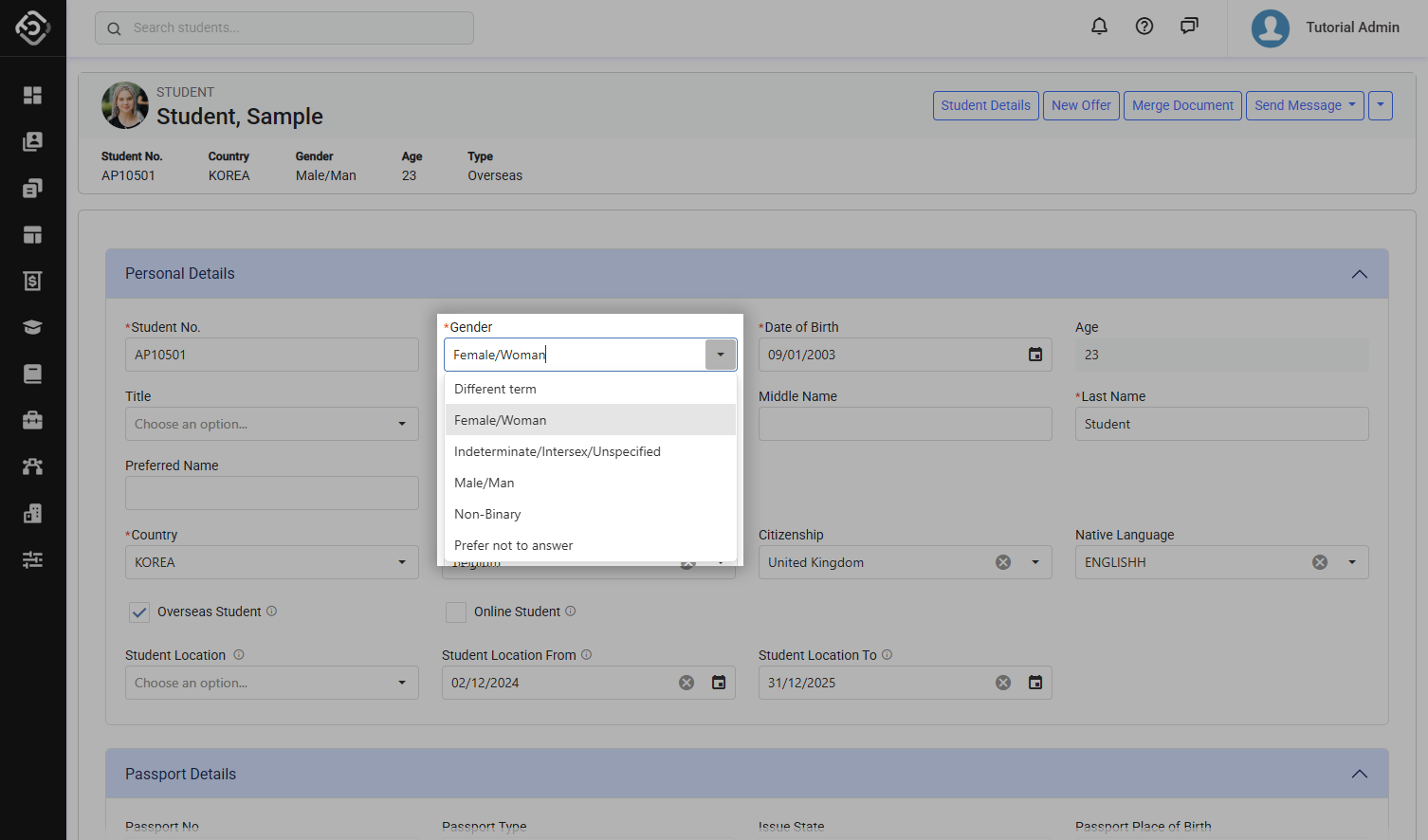
New options have been added to the Gender options to better support diversity and inclusive representation when recording student information, allowing institutions to more accurately reflect individual gender identities and support respectful, flexible data entry across different cultural and organisational contexts.
The updated Gender options are now available for selection as follows:
|
Option |
Code |
|---|---|
|
Male/Man |
M |
|
Female/Woman |
F |
|
Non-binary |
N |
|
Indeterminate/Intersex/Unspecified |
X |
|
Different term |
D |
|
Prefer not to answer |
P |
Schedule Payments Updates
🔥Schedule Agent Commission Payments, Now on Single Enrolment
new
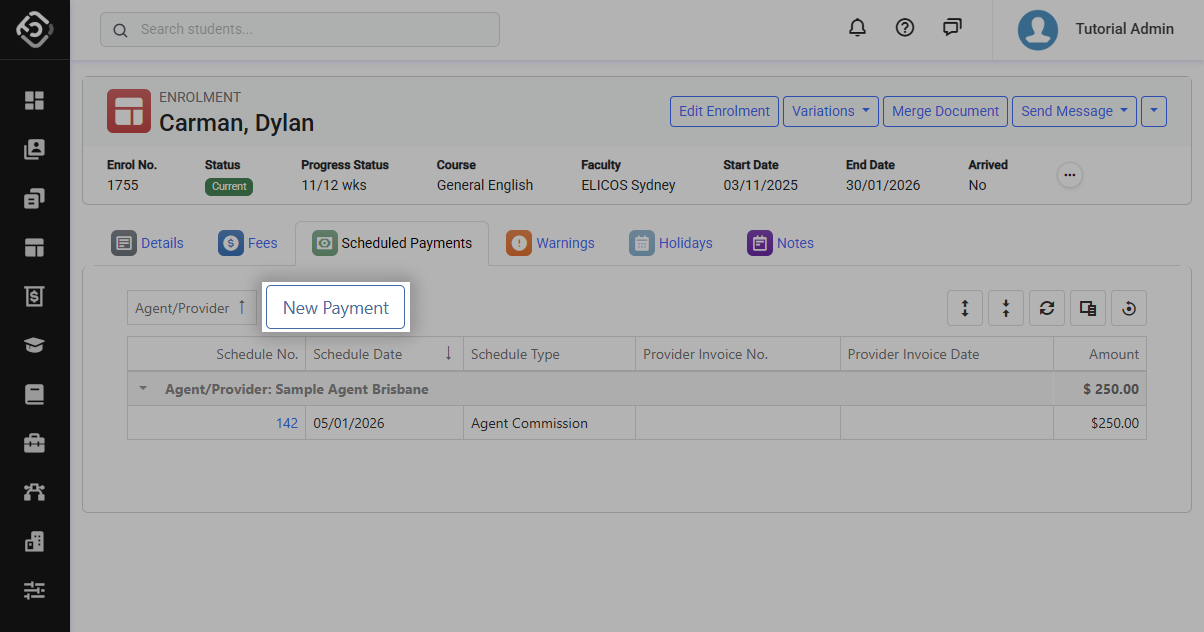
Scheduling agent commission payments per enrolment is now available in Next Generation.
A new action has been added to the Enrolment > Scheduled Payments tab, allowing you to create agent commission schedules directly from an individual enrolment. This removes the need to rely on bulk workflows when handling one-off or enrolment-specific commissions.
Export Agent Commission Schedules with Ease
new Nextgen ONLY New Permission Required
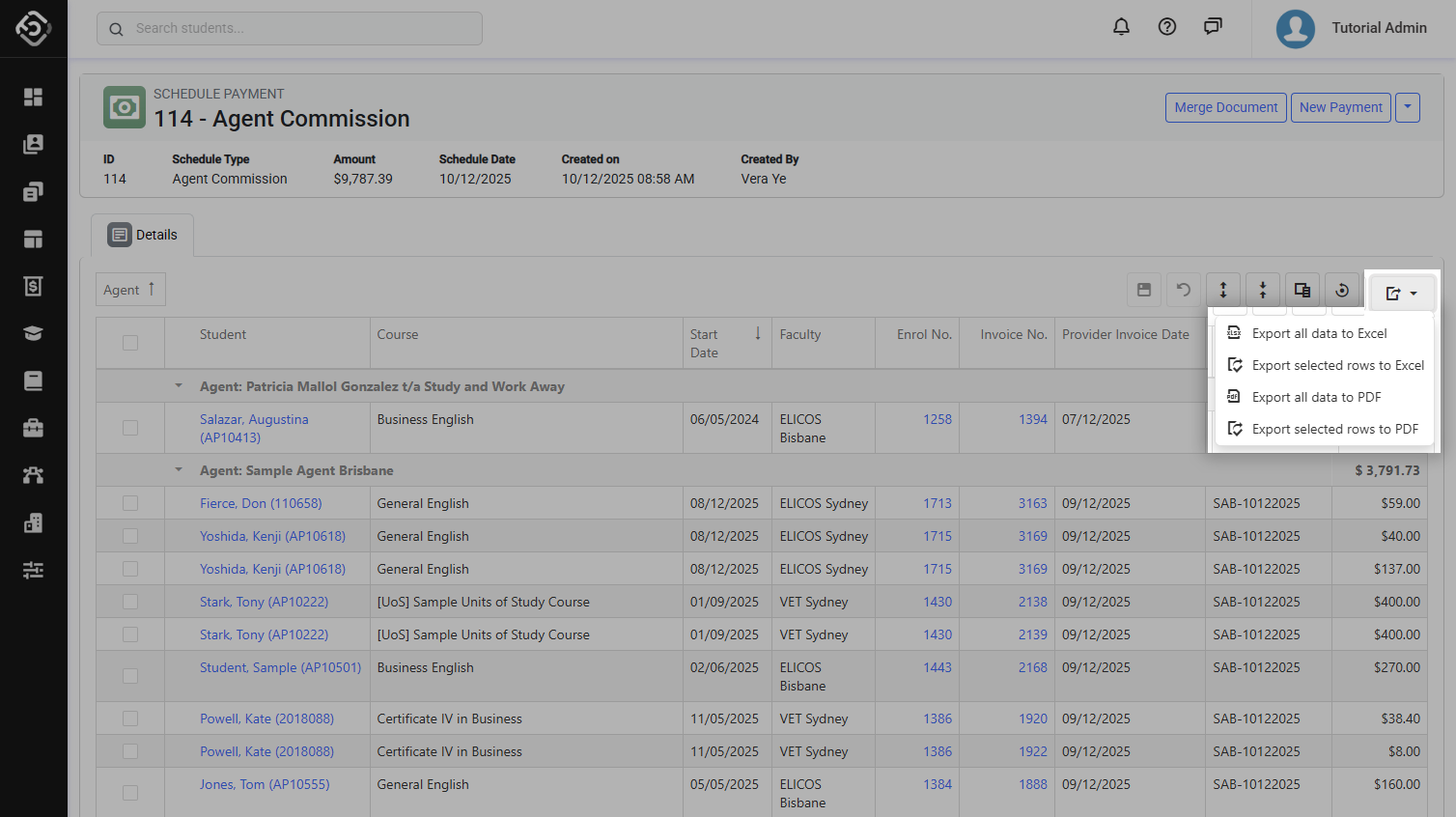
A new Export option is now available in the Agent Commission Scheduled Payments grid.
This allows you to quickly download scheduled commission data for reporting, reconciliation, or sharing with finance teams. With just a few clicks, you can extract accurate commission schedules without manual copying or custom reports, making commission management faster and more efficient.
External Payments Updates
External Payments in Recently Viewed
new Nextgen ONLY
External Payments now appear in the Recently Viewed section when logging in to Next Generation.
This update makes it easier to return to recently accessed payment records without repeating searches.
Settings Updates
Branding Set up Moved to Settings
Nextgen ONLY
The Branding Setup menu for managing your college logo has been moved to Utilities > Settings.
Institution Setup Updates
A new Institution Setup item has been added to the Utilities menu.
This area provides central access to manage core system resources such as companies, locations, faculties, courses, fees, and more. It brings key structural configuration into one place, making system administration clearer and easier to manage.
Institution Setup is designed for administrative use, helping ensure your organisational structure is configured consistently and maintained in a controlled environment.
Companies and Locations Now Available in Next Generation
new New Permission Required
Companies and Locations are now available in Next Generation. This release marks the first stage of the new Institution Setup rollout, with additional setup areas to be introduced progressively over time.
Integrations Updates
📊 Account Manager Field now Available in Reports
new POWER-BI v1.8.2 Equator API
The Agent Account Manager field is now included in the Agent Listing (12.062) Report on:
-
eBECAS/EDMISS Classic
-
API
-
Power BI connector (version 1.8.2)