
Overview
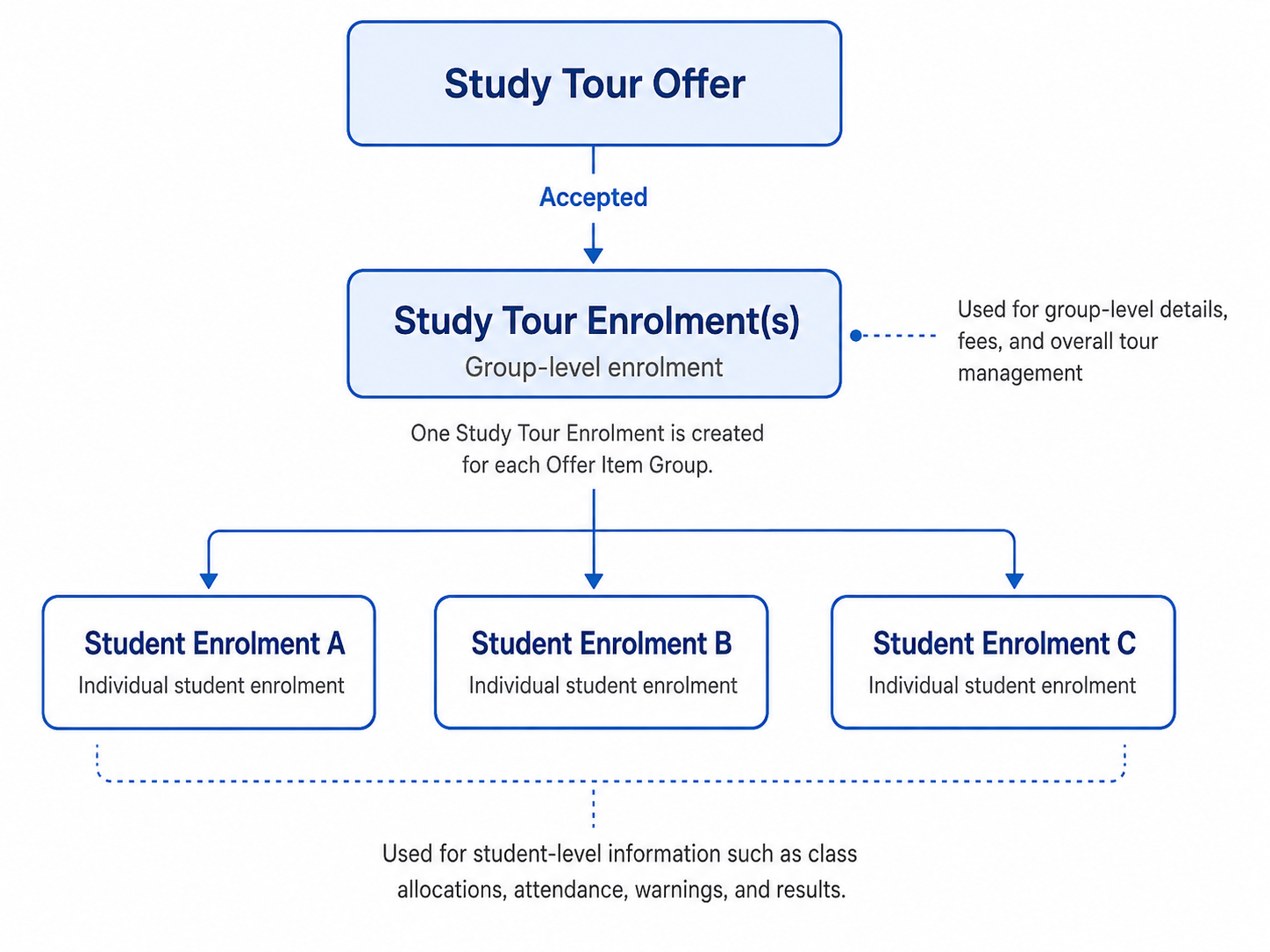
Study Tour Enrolments are created automatically when a Study Tour Offer is accepted. They are the group-level enrolment records used to manage the courses, financials, and other information for the Study Tour.
Each participating student also has an individual enrolment that is linked to the relevant Study Tour Enrolment. These individual enrolments contain the student-specific information only. All financial information for the Study Tour is managed through the Study Tour Enrolment.
Concepts and Terminology
Study Tour Offers and Study Tour Enrolments
Study Tour Enrolments are created by accepting a Study Tour Offer. When an offer contains multiple Offer Item Groups (one per course), each group creates a separate Study Tour Enrolment. This allows the courses and related fees in each group to be managed independently.
A Study Tour Offer can therefore be linked to multiple Study Tour Enrolments, while each Study Tour Enrolment is linked to the Offer from which it was created.
Study Tour Enrolments and Individual Student Enrolments
A Study Tour Enrolment represents the group-level enrolment created for the Study Tour. All financial information, including invoices, payments, and other financial records, is managed only from the Study Tour Enrolment.
An individual student enrolment is also created for each participating student and linked to the corresponding Study Tour Enrolment. Individual student enrolments are used to manage student-specific academic and operational information, such as class allocations, attendance, warnings, results, and holidays. Financial information is not managed from these individual enrolments.
Students can be added to a Study Tour Enrolment after the Study Tour Offer has been accepted. When a student is added, an individual student enrolment is created automatically and linked to the Study Tour Enrolment.
Arrived Flag
The Arrived field on a Study Tour Enrolment indicates that the Study Tour group has arrived. When a Study Tour Enrolment is marked as Arrived, all individual student enrolments linked to that Study Tour Enrolment are also marked as Arrived.
Topics
-
Create and Edit Study Tour Enrolments Study Tour Enrolments are created automatically when a Study Tour Offer is accepted. They provide the group-level records used to manage the enrolment details and financial information for the Study Tour. Basic study tour enrolment details can be updated from the Study Tour Enrolment page.
-
Search Study Tour Enrolments Study Tour Enrolments can be searched, reviewed, and managed from the Study Tour Enrolments Search View.
-
Study Tour Enrolment Details A Study Tour Enrolment is the group-level enrolment created when a Study Tour Offer is accepted. It follows the same structure and functionality as a standard enrolment while remaining linked to the relevant Study Tour Group and the participating students' individual enrolments.
-
Scheduled Payments (Study Tour Enrolment) The Scheduled Payments section in a study tour enrolment allows you to view and track payments scheduled to providers for services related to that study tour enrolment.
-
Study Tour Enrolment Fees The Study Tour Enrolment Fees page provides a comprehensive view of all financial activity associated with a Study Tour Enrolment, including invoices, payments, due and overdue balances, refunds, and more.
-
Study Tour Enrolment Variations Study Tour Enrolment Variations allow changes to be made to a Study Tour Enrolment after the related Study Tour Offer has been accepted. Variations applied to the Study Tour Enrolment are also applied to all linked individual student enrolments.
-
Study Tour Enrolment Students The Study Tour Enrolment Students tab displays all students linked to the Study Tour Enrolment. From this tab, you can add additional students and manage supported enrolment variations for individual students without affecting the rest of the Study Tour.
-
Study Tour Enrolment Recalculate The Study Tour Enrolment Recalculation process is automated and activated by various system events; however, it can also be manually initiated for specific study tour enrolments.
-
Study Tour Enrolment Logs For auditing purposes, the Study Tour Enrolment Logs record and display events related to updates on the enrolments.