
The Scheduled Payments section in a study tour enrolment allows you to view and track payments scheduled to providers for services related to that study tour enrolment.
Overview
Financial information for a Study Tour is managed at the Study Tour Enrolment level rather than through the linked individual student enrolments. Scheduled Payments therefore relate to the fees recorded against the Study Tour Enrolment.
The process for viewing Scheduled Payments and scheduling agent commission payments follows the standard Enrolment Scheduled Payments process.
For information about viewing Scheduled Payments, creating an agent commission payment schedule, and managing payment details, see Scheduled Payments (Enrolment).
All financial information for a Study Tour is managed through the Study Tour Enrolment. The individual student enrolments linked to the Study Tour do not contain any financial information.
Access Study Tour Enrolment Scheduled Payments
-
Go to the Scheduled Payments tab of the Study Tour Enrolment of interest.
-
You will see the scheduled payments associated with the Study Tour Enrolment on the data grid. Through Group by Column option, users can group schedule payment items by different fields. By default, items are grouped by Schedule ID, but you can customise the grouping by selecting another field. Learn more about grid grouping here.
For details about available buttons, refer to this article: Data Grids | Single Grid Composition.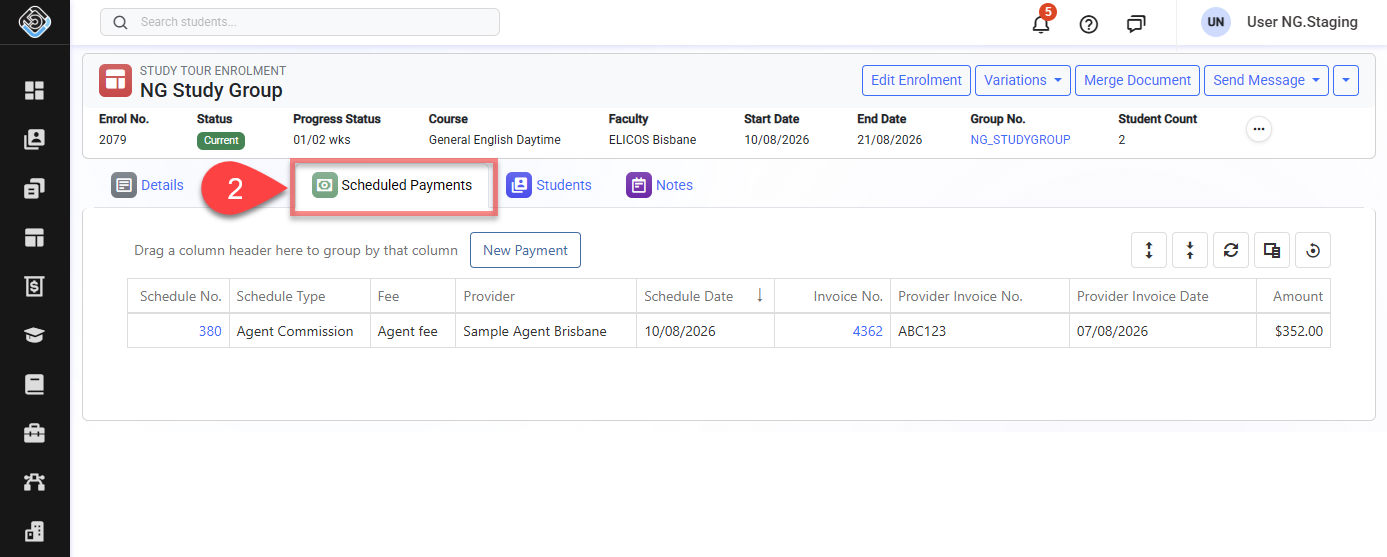
Schedule Agent Commission Payments for a Study Tour Enrolment
For instructions on searching for due payments, selecting payment items, reviewing the payment summary, and creating a Scheduled Payment, see Scheduled Payments (Enrolment) | Schedule Agent Commission Payments for an Enrolment