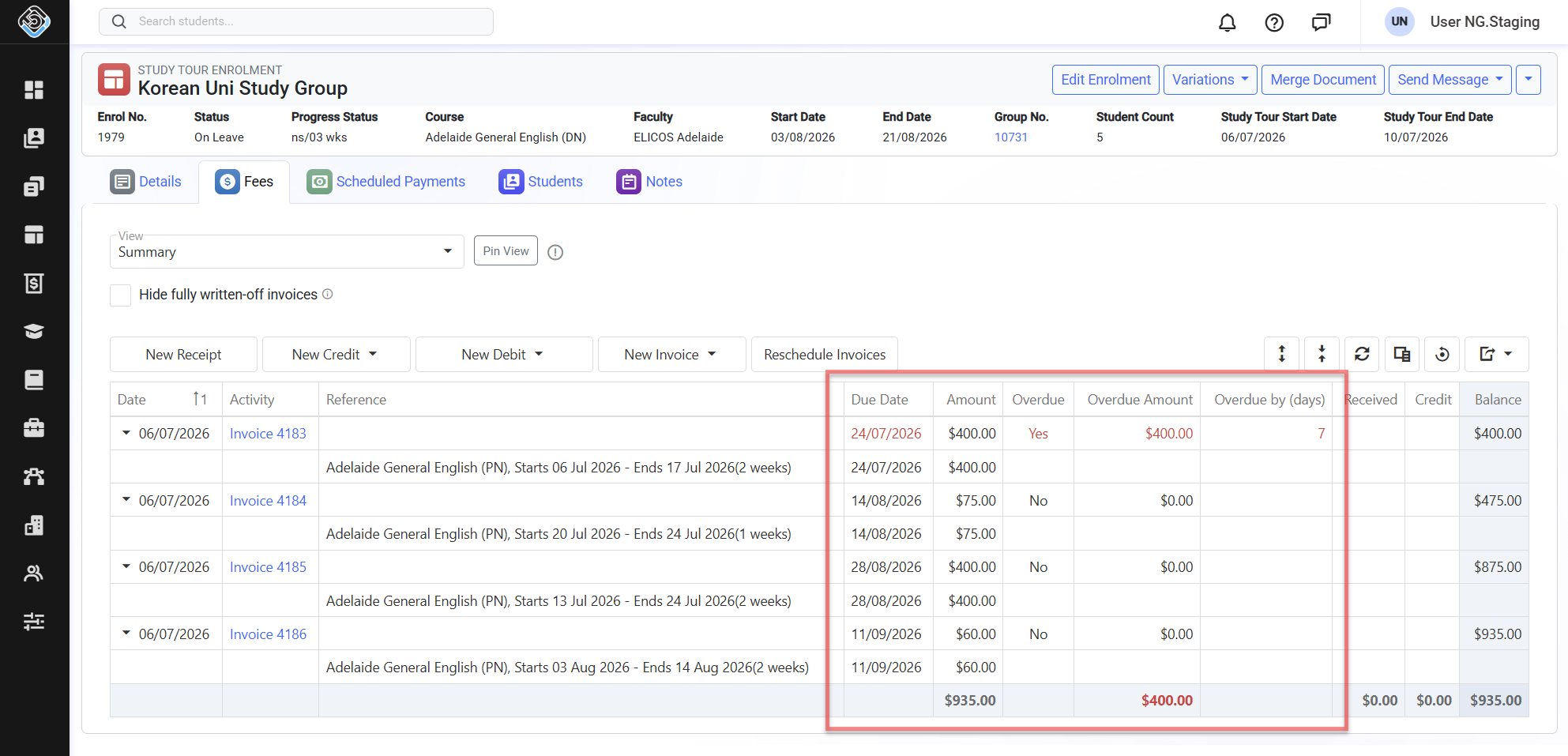
The Study Tour Enrolment Fees page provides a comprehensive view of all financial activity associated with a Study Tour Enrolment, including invoices, payments, due and overdue balances, refunds, and more.
All financial information for a Study Tour is managed through the Study Tour Enrolment. The individual student enrolments linked to the Study Tour do not contain any financial information.
View Study Tour Enrolment Fees
-
Go to the study tour enrolment of interest and click on the Fees tab.
-
A page with the Fees Views for that study tour enrolment will display.
-
Customise these views as required by adding/removing and/or organising the columns. Learn more about customising the Fees Views here.
Manage Study Tour Enrolment Fees
Financial actions for a Study Tour are managed from the Fees tab of the Study Tour Enrolment. These actions follow the standard enrolment finance processes. For detailed instructions on the available fee-related actions, refer to the relevant enrolment finance articles below:
Monitor Due and Overdue Fees for Study Tour Enrolments
The Fees view provides a clear overview of all fees for a Study Tour Enrolment, including invoice amounts, due dates, and any due or overdue balances, making it easy to monitor outstanding payments.
To review due and overdue fees:
-
Go to the Fees view on the study tour enrolment of interest.
-
Choose the view that better works for you (learn about Fees Views).
-
Customise the grid by adding any of the following columns
-
Due Date: Displays the date by which the invoice amount is due.
-
Amount: Displays the total amount of the invoice.
-
Overdue: Indicates whether the invoice has passed its due date.
-
Overdue Amount: Displays the outstanding amount that is overdue.
-
Overdue By: Displays the number of days the invoice is overdue.
-
-
You can click on the entry of interest for more details about that transaction.
Where an invoice is overdue, its due date and overdue values are highlighted in red.