
The Study Tour Group Details page in eBECAS/EDMISS serves as the primary hub for accessing and managing Study Tour information.
Study Tour Group Details Layout
When viewing the Study Tour group details page, it is structured as follows:
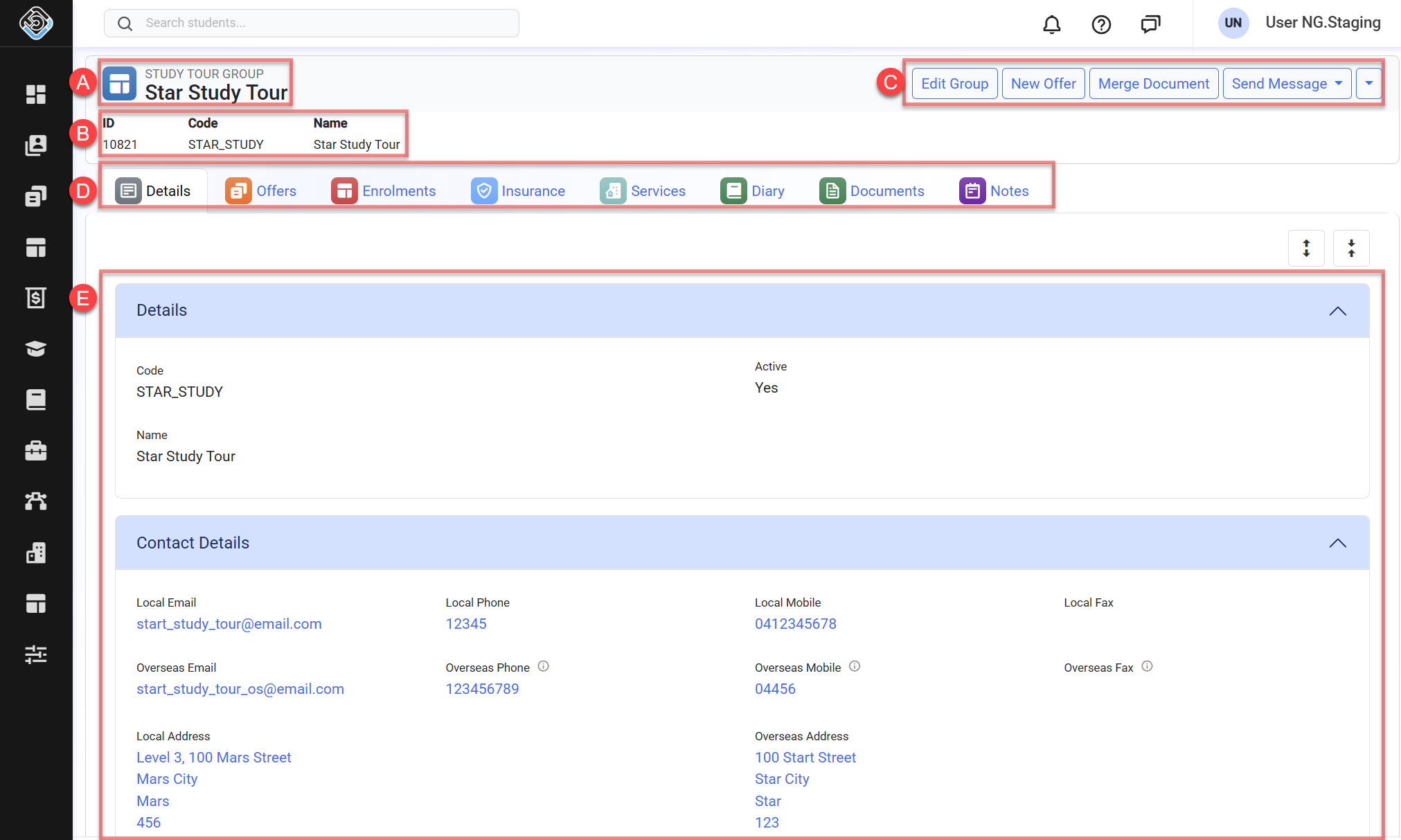
A. Study Tour Group Name: This section displays the study tour group name.
B. Study Tour Group Basic Details: It displays a brief overview of the study tour group’s information.
C. Header Quick Action Panel: A collection of actions available for the study tour group. Depending on permissions, the actions available might differ.
D. Navigation Tabs: A collection of links that allows easy navigation to the study tour group's related data. Depending on the permissions and features available on your subscription plan, the tabs available might differ.
E. Study Tour Group Details Form: The study tour group details. The fields and layout in this form are based on the layout set up by your system administrator.
Study Tour Group Quick Actions
From the study tour group details page, you can take the following actions:
The actions available might differ based on your role (permissions). Contact your system administrator for more details.